
LinkedNav already works well with the default setup. Using your own proxy is optional and mainly for users who want extra routing control.
This guide helps you:
- Add a proxy in Settings
- Connect a LinkedIn account with that proxy (or without one)
- Keep account routing consistent
Quick Answer: Do You Need a Proxy?
No. Most users can run LinkedNav with no proxy.
Use a proxy only if you prefer:
- More control over account routing
- Regional IP consistency (for example, Belgium)
- A dedicated network path per LinkedIn account
With Proxy vs Without Proxy
- No proxy: best for users who want the fastest setup, with very low setup effort.
- Optional proxy: best for users who want added routing control, with low setup effort.
Both options are supported.
Step 1: Add Proxy in Settings (Optional)
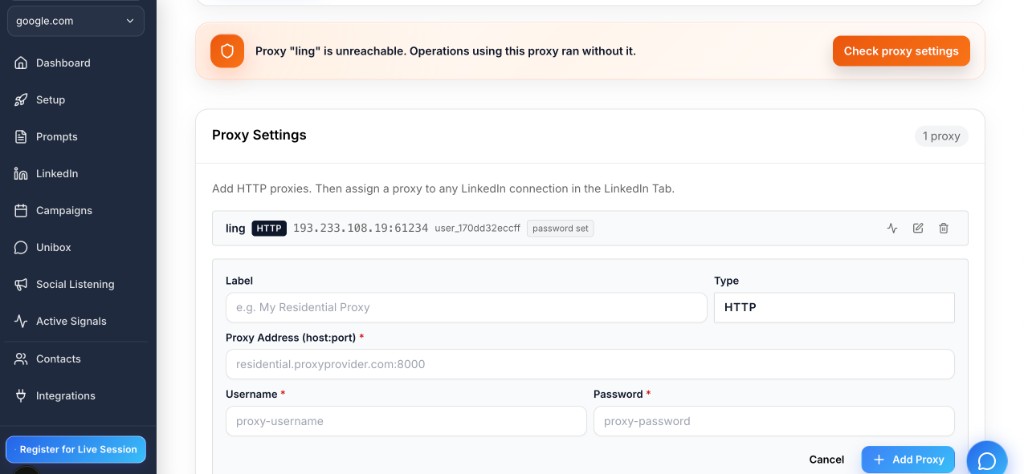
Go to Settings -> Proxy Settings and add:
- Label
- Type (HTTP)
- Proxy address (host:port)
- Username
- Password
Tips:
- Use one proxy per LinkedIn account when possible
- Double-check credentials
- If you see an unreachable warning, update the proxy details and test again
Step 2: Add a LinkedIn Connection (With or Without Proxy)
Go to LinkedIn -> Add Account and fill in:
- Label
- Country
- Email or phone
- Password
- Proxy (optional): select your proxy, or choose No proxy
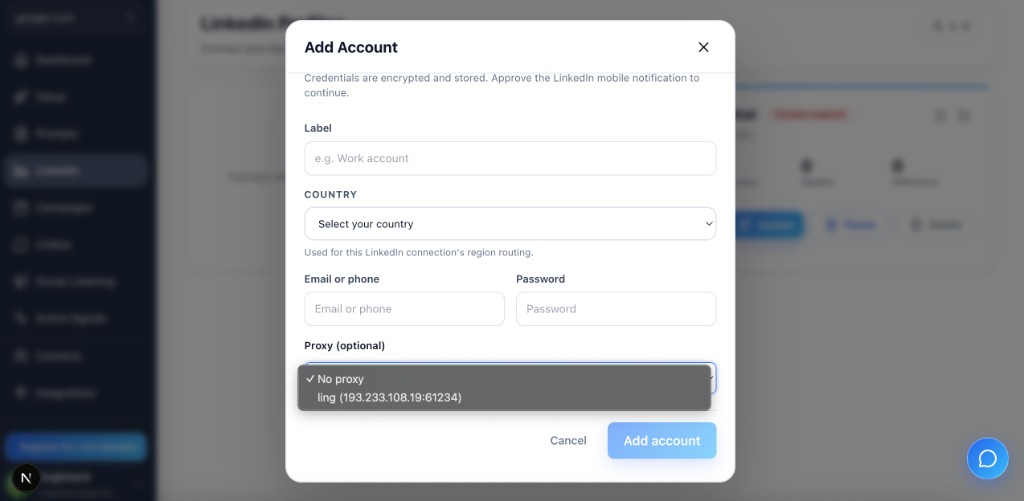
If a proxy is selected, LinkedNav uses that account setting consistently.
Will LinkedIn Show Belgium (or Another Region)?
If you use a Belgium proxy, LinkedIn will usually see that region for account activity. If you use no proxy, LinkedIn sees your regular network route.
Troubleshooting
"Proxy is unreachable. Operations using this proxy ran without it."
Check:
- Proxy host and port
- Username and password
- Provider restrictions or temporary outage
Then update settings and try again.
Login is successful but activity looks inconsistent
- Confirm the correct LinkedIn account is selected
- Confirm the intended proxy is assigned (if using one)
- Avoid frequently switching between different networks
FAQ
Do I need a proxy for every LinkedIn account?
No. Proxy is optional.
Can I connect LinkedIn without a proxy?
Yes. Default setup works well and is fully supported.
If I assign a proxy to one LinkedIn account, will LinkedNav use it?
Yes. LinkedNav uses the settings saved on that LinkedIn account.
If the proxy is unreachable, can I still continue?
Some actions may continue without proxy, but for consistency, update and stabilize your proxy settings first.
Related Guides
Final Checklist
- Decide: proxy or no proxy
- If using proxy, add it in Settings
- Add your LinkedIn account
- Pick the right account for your campaign
- Run a small test before scaling
Once your proxy is configured, these are the workflows it unlocks.