Last updated: June 2026
TL;DR — A LinkedNav comment campaign auto-posts comments on a curated list of LinkedIn posts on a daily schedule — so you warm up prospects without spending a connection-request slot. You choose who to reply to (the post, or each commenter), fixed vs AI-generated comments, and — for AI — whether they post automatically or wait for human approval. Add post URLs by hand or auto-import them from Social Listening. Since LinkedIn caps invites at ~100/week, comments give you a second channel that doesn't touch that budget, and a soft first touch that lifts later acceptance to 50–65%.
Why comment campaigns matter
LinkedIn caps connection requests at ~100/week (about 20/day). Hit the wall and most tools stop until Monday. A comment campaign adds a separate channel: instead of an invite, you leave a relevant comment on the prospect's post. They see your name, check your profile, and often send the request to you — outbound becomes inbound.
It's also softer. A cold invite gets 40–60% acceptance on a solid B2B offer; the same invite after a prospect has seen your comment runs 50–65%. Comments are part of LinkedNav's LinkedIn campaign automation toolkit.
| Dimension | Comment Campaign | Outreach Campaign |
|---|---|---|
| Action | Comments on posts | Invite + message sequence |
| Uses ~100/week quota | No | Yes |
| First touch | Soft (public) | Direct (private) |
| Reply target | Post or each commenter | The prospect |
| Comment source | Fixed or AI | Fixed / AI |
| Human approval | Yes | Yes (Unibox) |
The two pair well: warm a list with comments, then move the same people into an outreach sequence.
Step 1 — Create a comment campaign
On the Campaigns dashboard, click + New Campaign and pick Comment Campaign — "Automatically comment on a curated list of LinkedIn posts at scale following your daily schedule."
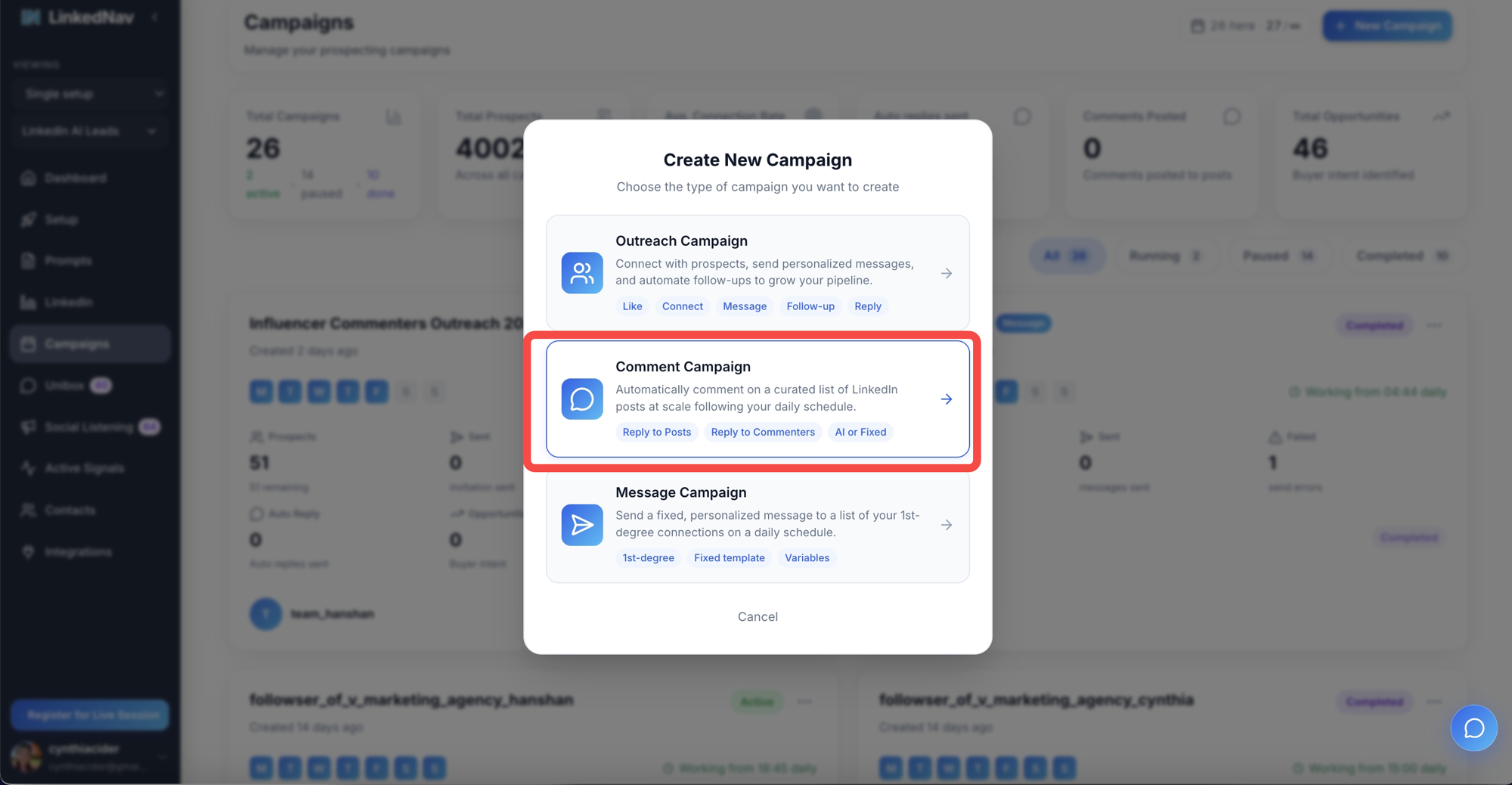
Its three tags — Reply to Posts, Reply to Commenters, AI or Fixed — are exactly the choices you make next. The wizard has six steps; the two that matter most are below.
Step 2 — Define your comment
This screen sets who you reply to and how the comment is written. Two independent choices.
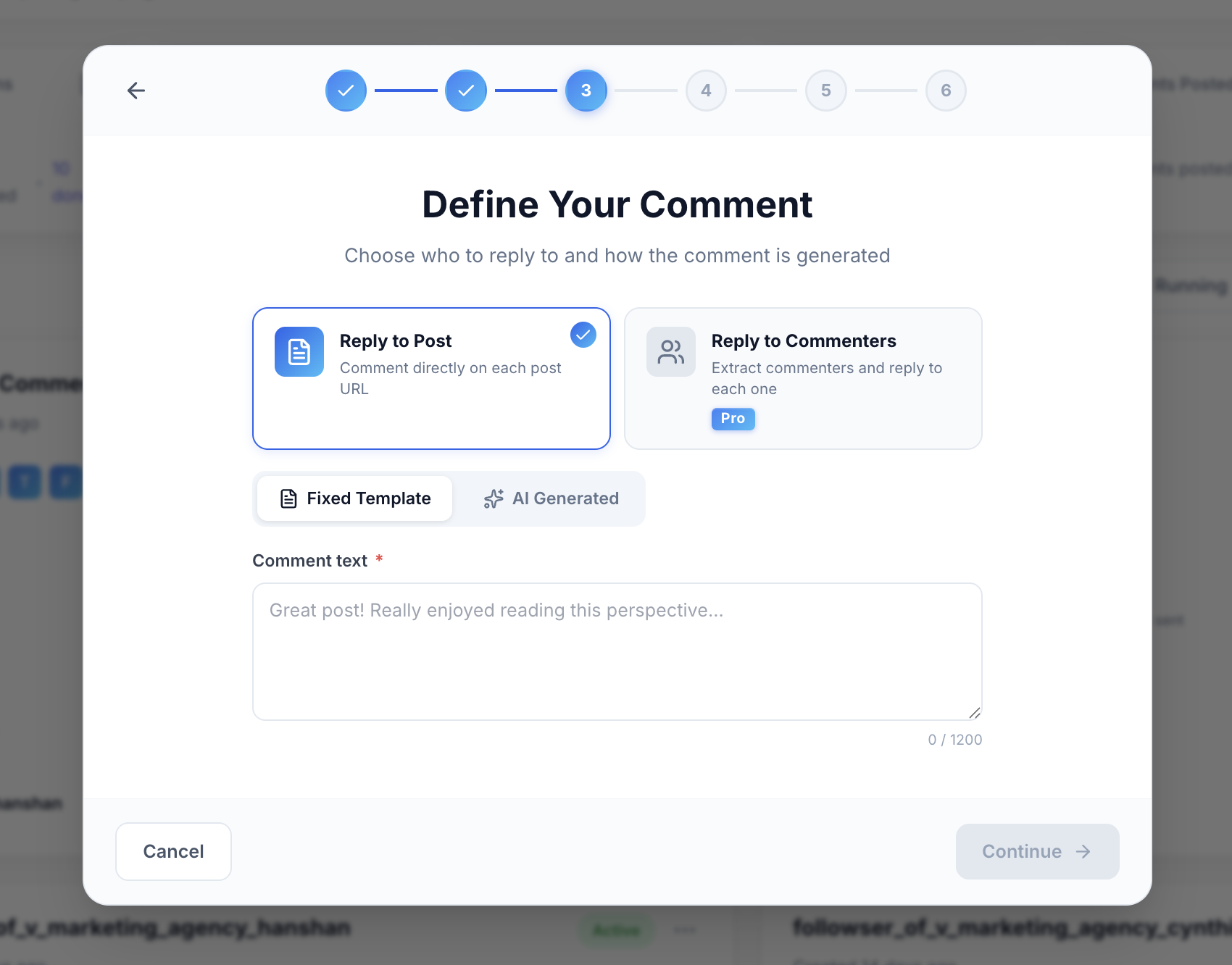
Who to reply to:
| Option | What it does | Plan |
|---|---|---|
| Reply to Post | Comments on each post URL you add | All plans |
| Reply to Commenters | Extracts every commenter and replies to each | Pro |
Reply to Post is one comment per post — best for visibility on high-traffic posts. Reply to Commenters turns one popular post with 80 comments into 80 personalized touchpoints, no invites spent.
How it's written:
- Fixed Template — one comment (up to 1,200 characters), used everywhere. Fast and predictable.
- AI Generated — LinkedNav reads each post/comment and drafts a contextual reply. For AI you also choose:
- With human approval — each comment queues as a pending comment to review, edit, or regenerate before posting — the same approve-before-send gate used for AI replies in the unified inbox. Recommended.
- Without human approval — comments post automatically on schedule.
Start with AI + human approval; after ~30 approved comments, switch the campaign to auto-post.
Step 3 — Add post URLs and schedule
Next is Post URLs & Schedule — "Add LinkedIn post URLs now or after creation. New campaigns start paused; add at least one URL before activating."
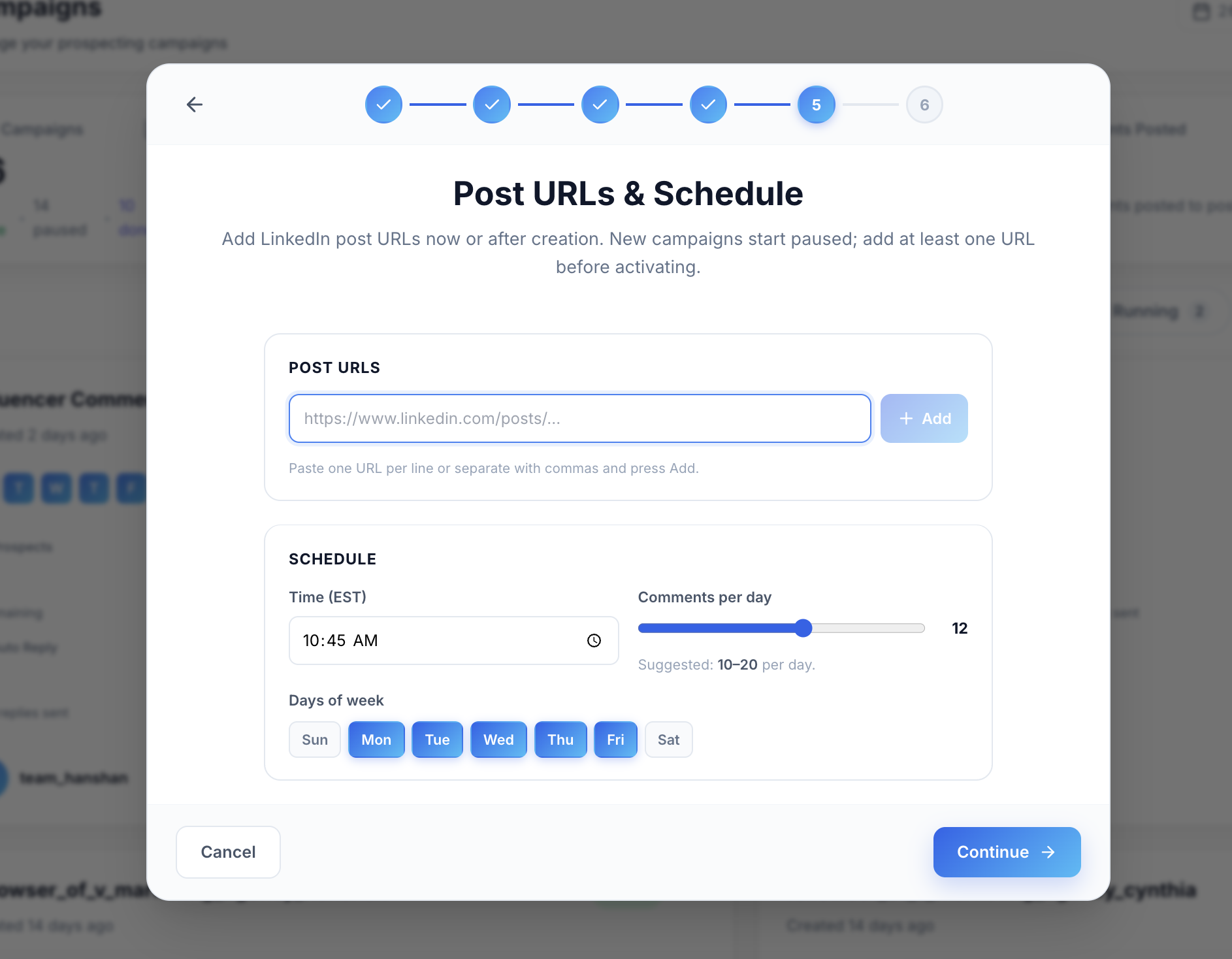
Paste post URLs (one per line or comma-separated) and press Add. Then set the schedule:
| Setting | Controls | Suggested |
|---|---|---|
| Time (EST) | When the daily batch runs | Buyers' working hours |
| Comments per day | Daily volume (slider) | 10–20/day |
| Days of week | Active days | Mon–Fri |
LinkedNav suggests 10–20 comments/day across Mon–Fri to stay human-paced — the same server-side, browser-based execution used across LinkedIn sales automation, not raw API calls. The campaign stays paused until at least one URL is added.
Try LinkedNav comment campaigns free
Connection limits throttling your pipeline? Comment campaigns add a second channel that never touches your ~100/week invite quota — AI-drafted, human-approved.
- Free: $0, no credit card. Build your first campaign in minutes.
- Standard: $49/month. Campaign automation, Signal Agent, AI comments, Unibox.
- Pro: $99/month. Adds Reply to Commenters and Social Listening auto-import.
Start free → Open Campaigns →
Step 4 — Auto-import posts from Social Listening
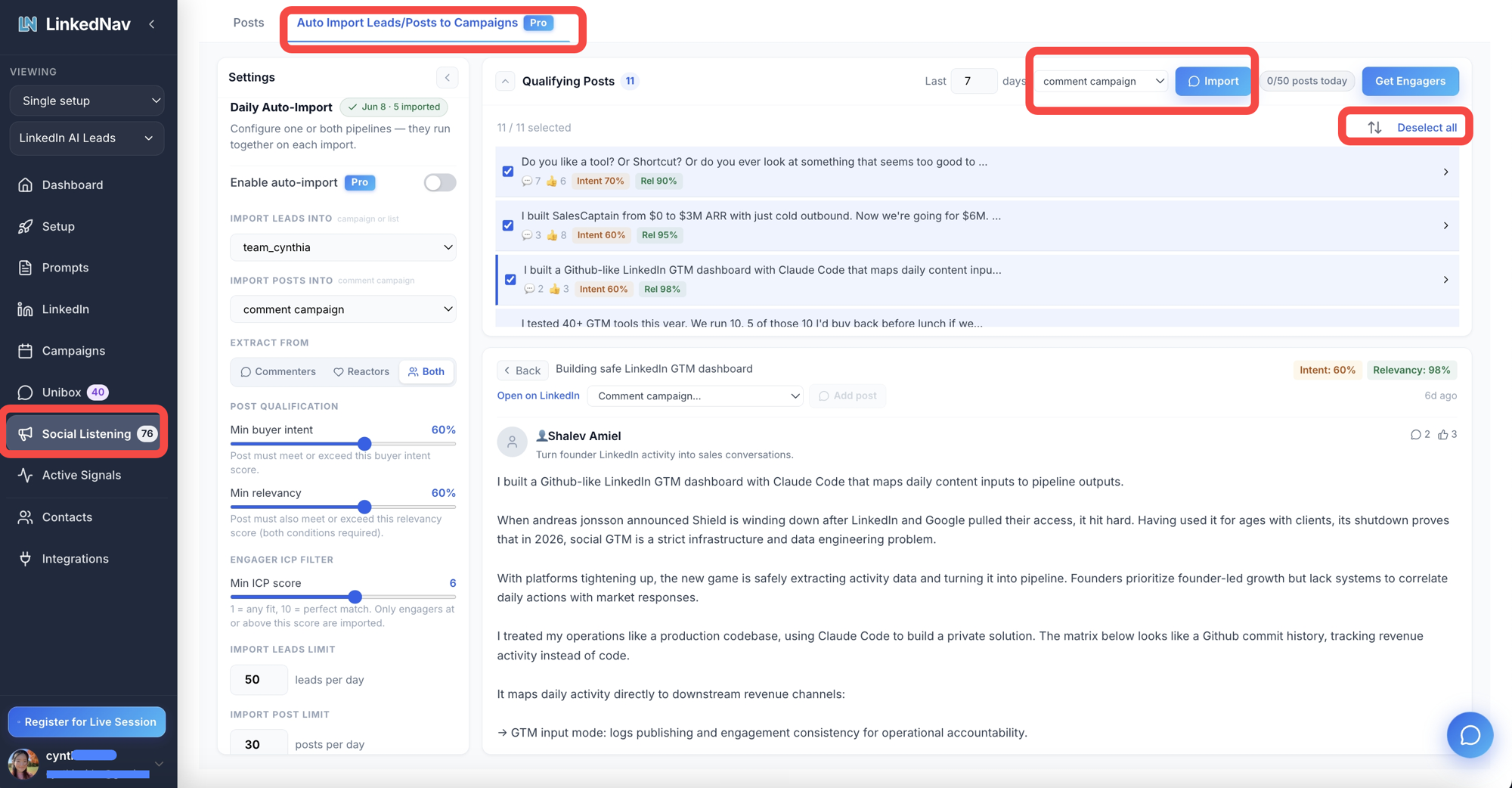
Finding good posts by hand is the slow part. Social Listening → Auto Import Leads/Posts to Campaigns (Pro) does it for you.

The Qualifying Posts panel scores recent posts by buyer intent and relevancy. To load them:
- Set Import Posts Into to your comment campaign.
- Review the list — each post shows Intent (e.g. 60–70%) and Relevancy (e.g. 90–98%). Use Deselect all, then check the posts you want.
- Click Import — selected posts drop into the campaign's URL list.
Turn on Daily Auto-Import to run it continuously:
| Setting | Does | Typical |
|---|---|---|
| Extract from | Commenters / Reactors / Both | Both |
| Min buyer intent | Post must meet this | 60% |
| Min relevancy | Post must also meet this | 60% |
| Min ICP score | Engager fit (1 any – 10 perfect) | 6 |
| Import post limit | Posts/day | 30 |
| Import leads limit | Engagers/day | 50 |
Each morning LinkedNav surfaces fresh, on-topic posts within a 24-hour window and loads them automatically — the same buying-signal engine behind Social Listening lead import, routing posts instead of people.
How it fits the full system
A comment campaign is strongest as one layer of a sequence:
- Social Listening finds a high-intent post within 24 hours and imports it.
- Comment campaign posts an AI-drafted, human-approved comment (or replies to commenters).
- The prospect sees your name and warms up.
- An outreach campaign sends the invite — now at 50–65% acceptance.
- AI follow-ups draft in your Unibox for approval.
- Auto-withdraw clears unaccepted invites after ~14–21 days, keeping you under LinkedIn's ~1,000 pending cap.
Because comments don't touch the invite budget, run them alongside outreach across multiple sender accounts to multiply touchpoints — the core of modern LinkedIn lead generation.
Best practices
- 10–20 comments/day. More reads as automation.
- Lead with AI + approval. Approve ~30 before auto-posting.
- Comment on relevance. A 60% intent / 90% relevancy post earns the slot; a generic viral post doesn't.
- Add value, don't pitch. A real response earns profile visits; "Great post!" gets ignored.
- Pair Reply to Commenters with popular posts. 80 comments = 80 warm touches.
Frequently Asked Questions
What is a comment campaign in LinkedNav?
A comment campaign is a LinkedNav campaign type that automatically posts comments on a curated list of LinkedIn posts following a daily schedule. Instead of sending connection requests, it leaves comments on posts you supply — either replying to each post directly or replying to every commenter. Comments can be a fixed template you write or AI-generated from the post's content, and AI comments can optionally wait for your human approval before posting. It expands daily outreach without consuming LinkedIn's weekly connection-request limit.
What's the difference between Reply to Post and Reply to Commenters?
Reply to Post comments directly on each post URL you add — one comment per post, aimed at the author and readers. Reply to Commenters is a Pro feature that extracts everyone who commented on a post and replies to each individually, turning one popular post into dozens of personalized touchpoints. Reply to Post is best for visibility on high-traffic posts; Reply to Commenters is best for scaling personalized engagement with an already-active audience.
Should I use fixed template or AI-generated comments?
Use a fixed template when you want one simple, predictable comment in your exact voice across every post — it supports up to 1,200 characters. Use AI-generated comments when you want each comment to actually respond to the specific post or commenter, which looks far more genuine and earns more profile visits. Most teams choose AI-generated with human approval enabled, review the first batch of around 30 comments, then switch to automatic posting once the tone is consistent.
Do AI comments post automatically or do I approve them first?
You choose. AI-generated comments can run with human approval, where every comment queues as a pending comment for you to review, edit, regenerate, or reject before it posts in your name. Or they can run without human approval, posting automatically on your schedule. The recommended approach is to start with human approval for the first week or two to calibrate quality and tone, then switch the same campaign to automatic posting once you trust the output.
How many comments per day should I run?
LinkedNav suggests 10 to 20 comments per day. This range keeps activity human-paced and protects your account, since LinkedIn flags unnatural bursts of automated behavior. Comments are scheduled at a time you set and spread across the days you select (Monday through Friday is typical), so engagement mirrors normal business-hours posting rather than one large batch. Because comments don't use your connection-request quota, this volume runs on top of, not instead of, your outreach campaigns.
How do I add posts to a comment campaign?
You can add LinkedIn post URLs two ways. Manually: paste URLs into the Post URLs field, one per line or separated by commas, and press Add. Automatically: use Social Listening's Auto Import, select your comment campaign as the destination under Import Posts Into, then import qualifying posts on demand or enable daily auto-import. Auto-import filters posts by minimum buyer intent, minimum relevancy, and ICP score, so only fresh, on-topic posts within a 24-hour window flow into your campaign.
Do comment campaigns count against my LinkedIn connection limit?
No. Comments are separate from connection requests, so a comment campaign does not consume any of your roughly 100 weekly invites. That's the core advantage: you can run a comment campaign for visibility and warm-up at the same time as a full outreach campaign that sends invites and messages, effectively doubling your daily touchpoints. Auto-withdraw separately keeps your pending invites under LinkedIn's roughly 1,000-invite cap.
Sources
- LinkedNav: https://www.linkednav.com/
- LinkedIn Help — commenting and connection limits: https://www.linkedin.com/help/linkedin/
- LinkedIn Marketing Solutions — engagement best practices: https://www.linkedin.com/business/marketing
- G2 — LinkedIn automation category: https://www.g2.com/categories/linkedin-automation